August 20, 2026 • Tomás Guerreiro • 11 min reading time • Specs verified June 18, 2026
Orbit B-hyve XD 4-Port and XR Smart Controllers: What Owners Praise, What Breaks, and How to Set Them Up for Success
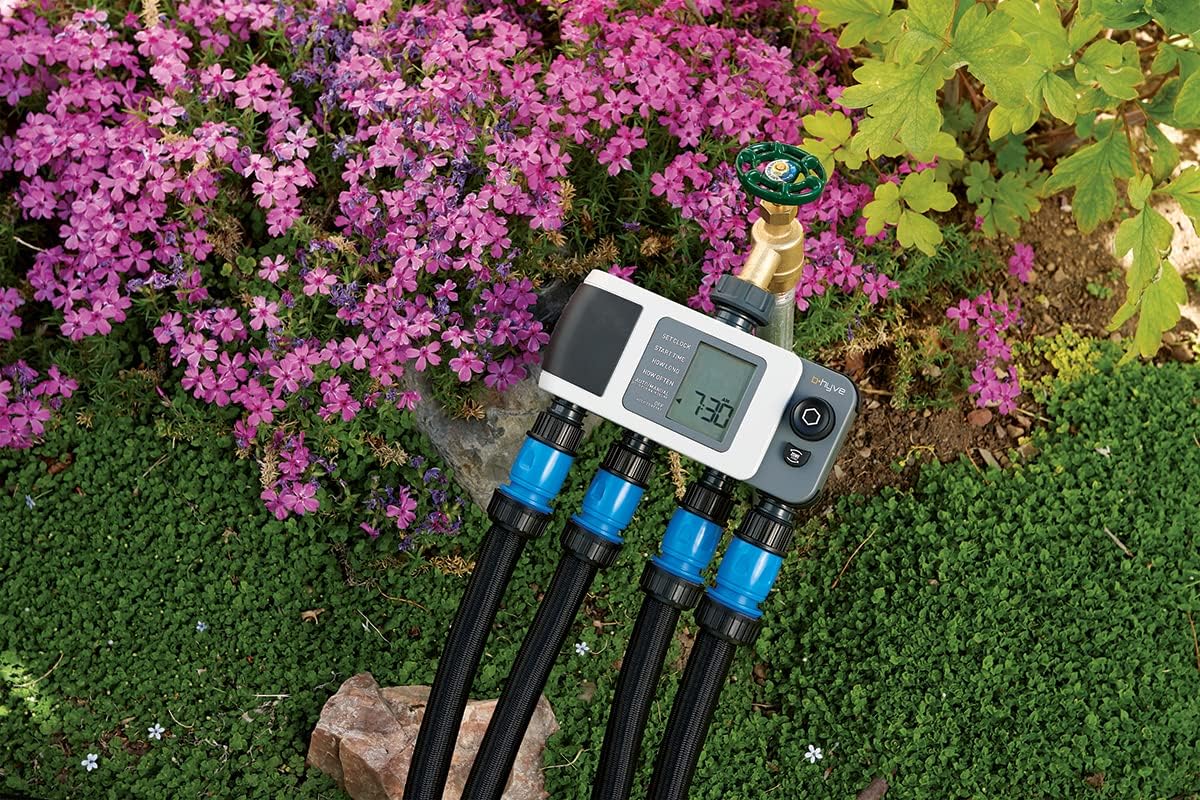
If you’ve been managing a yard with a basic hose-end timer — the kind with a dial you twist and hope for the best — or you’re running an older in-ground controller that predates smartphone apps, the Orbit B-hyve line is probably on your radar. “Smart irrigation controller” just means a timer that connects to your home WiFi (or a dedicated wireless hub) and uses real weather data to adjust watering schedules automatically, so it skips a cycle when rain is coming or trims run times when the forecast is mild. The pitch is fewer wasted gallons, less babysitting, and a yard that gets water when it actually needs it. Orbit’s B-hyve family splits into two very different product experiences: the XD 4-Port Smart Hose Timer (a battery-powered device that screws onto an outdoor spigot and manages up to four hose-line zones) and the XR Smart In-Ground Controller (a hardwired, multi-zone controller that replaces or upgrades a traditional valve-and-wire irrigation system). This article untangles what owners actually report after living with both products — including one particularly frustrating failure loop on the XD that shows up repeatedly in long-form reviews — and gives you a clear setup framework so you don’t repeat their mistakes.
| EDITOR'S PICKOrbit B-hyve XR Smart Sprinkler… | Mid-tierOrbit B-hyve Smart Indoor/Outdo… | Budget pickOrbit B-hyve Indoor Smart Sprin… | |
|---|---|---|---|
| Zones | 16 | 6 | 8 |
| Indoor/Outdoor | Indoor/Outdoor | Indoor/Outdoor | Indoor |
| WiFi | ✓ | — | ✓ |
| Weatherproof | ✓ | ✓ | — |
| Custom programs | ✓ | ✓ | — |
| Price | $166.41 | $108.56 | $86.29 |
| See on Amazon → | See on Amazon → | See on Amazon → |
The B-hyve XR In-Ground Controller: Where the Platform Earns Its Praise
If you’re consolidating zones from an aging system, the XR’s headline feature is capacity. Owners in aggregated review pools consistently cite the ability to replace two separate legacy controllers with a single 16-zone XR as a meaningful quality-of-life win — fewer power sources, one app login, one schedule logic to maintain. That consolidation value is real and worth pricing into your decision, especially if you’re managing a property with distinct front/back systems on different timers.
The physical screen is the detail reviewers mention most when comparing B-hyve to competitors. Owners who specifically switched from Rachio — a well-regarded platform in the enthusiast community — return to this point with notable frequency: the Rachio 3 is app-only for most functions, and that creates friction when you’re standing at the box with muddy gloves and want to manually trigger a zone test. The XR’s on-device display and button controls let you do that without pulling out a phone. For a practitioner who does a lot of zone-by-zone valve diagnostics or hands-off seasonal adjustments, that’s not a minor convenience — it’s a workflow advantage.
Weather-based scheduling performance is the second consistent praise point. Owners who have run the XR through a full annual cycle (including shoulder seasons where forecast conditions are variable) report that the ET-based — evapotranspiration, meaning the controller calculates how much water the landscape is losing to heat and wind and adjusts accordingly — scheduling genuinely reduces unnecessary run cycles. The EPA’s WaterSense program, which certifies smart controllers that demonstrably reduce water use, has documented that certified ET-based controllers can cut landscape water use by 15–20% compared to fixed-schedule timers; the Irrigation Association’s smart controller testing protocols echo similar ranges. The XR carries WaterSense certification, which matters both for water savings and for utility rebate eligibility — check your local water authority’s rebate list before purchase.
By the Numbers: B-hyve XR at a Glance
| Spec | Detail |
|---|---|
| Zone capacity | 6, 8, or 16 zones (model-dependent) |
| Network | 2.4 GHz WiFi (built-in) |
| Certification | EPA WaterSense certified |
| On-device control | Yes — physical screen + buttons |
| Rain sensor input | Wired sensor port (standard 2-wire) |
One tradeoff worth naming explicitly: the XR’s weather intelligence depends on your ZIP code weather station data, not a sensor physically on your property. If your microclimate diverges meaningfully from the nearest personal weather station — a common situation in coastal areas, canyon properties, or lots with significant shade — you’ll want to supplement with a physical rain sensor wired to the controller’s sensor port. The University of California ANR’s landscape irrigation scheduling guidance specifically notes that microclimate variation within a single ZIP code can be large enough to undermine forecast-only scheduling; a wired rain sensor costs under $30 and closes that gap.
The B-hyve XD 4-Port Hose Timer: A Capable Device With a Documented Reliability Problem
Here’s where the honest analysis gets uncomfortable, because the XD 4-Port generates the most detailed negative owner accounts in the entire B-hyve product family — and the failure pattern is specific enough to be actionable.
The failure loop, documented in multiple long-form owner reviews, runs like this: the app shows the device as connected, you initiate a manual watering run, watering begins after a 15-second delay, but the app never transitions to an “active watering” state. After a timeout period, the app returns an error. The physical device may be watering correctly — or may not be, depending on whether the command fully transmitted. The result is that owners spend more time troubleshooting the app’s connection state than they do actually irrigating. One reviewer described the experience as “more troubleshooting time than watering time,” which is a damning ratio for a convenience product.
The documentation problem compounds this. Multiple XD owners have specifically called out Orbit’s manual for the 4-Port as inadequate to the point of appearing to reflect institutional indifference — the kind of thin, unclear documentation that suggests the product shipped before the user-experience loop was closed. This is a specific, corroborated complaint across independent reviews, not a one-off frustration.
However, the positive XD owners reveal something useful: almost every owner with a good experience reports using three things together — the XD timer itself, the separately-purchased Orbit B-hyve WiFi Hub, and an iPhone. That’s not a coincidence. The XD 4-Port’s built-in Bluetooth connectivity has notably shorter range and less reliable handoff than a dedicated hub provides. Android owners and hub-free users account for a disproportionate share of the negative reviews, suggesting that the XD performs adequately as a system when properly equipped, but performs poorly as a standalone Bluetooth-only device.
If X, then Y — XD Decision Rule:
- If you’re adding hose-line zone control to an existing property that already has a B-hyve hub, then the XD 4-Port is a reasonable addition; the hub resolves the connectivity issues that drive the worst reviews.
- If you’re buying the XD as a standalone, hub-free, WiFi-only solution, then budget the frustration tax in — or consider whether a simpler single-zone mechanical timer or a competitor’s hub-included bundle better fits your use case.
- If you’re on Android and expecting the same experience as iOS users, then expect some additional troubleshooting, particularly around manual run initiation and connection status feedback.
The 6-zone and 8-zone B-hyve in-ground controllers receive notably cleaner reviews than the XD, reinforcing that the hose timer’s problems appear to be specific to that product category, not a platform-wide reliability issue.
Setup Framework: Getting Either Controller to Actually Perform
Most owner frustration — with either product — traces back to setup decisions made in the first 20 minutes. Here’s the short version of what experienced owners recommend.
Network placement comes first. Both the XR and the hub-connected XD communicate over 2.4 GHz WiFi only. If your outdoor controller location has marginal 2.4 GHz signal — common with modern routers that prioritize 5 GHz — you will get intermittent connectivity regardless of any other setup decisions. Run a signal check at the controller mounting location before installation. A WiFi extender configured to broadcast a dedicated 2.4 GHz SSID solves this and costs less than one service call.
Zone logic before schedule logic. This is the universal failure point in smart irrigation, and it applies here too: the B-hyve’s ET-based scheduling can only optimize what your zones actually segregate. If your drip bed zones and turf rotor zones are mixed into the same schedule group, the algorithm will average their water needs and underperform both. Separate turf zones from bed zones, slopes from flat ground, and full-sun exposures from shade exposures before you touch the scheduling interface. The EPA WaterSense program’s smart controller guidance and UC ANR’s irrigation scheduling documentation both emphasize proper zoning as the prerequisite for ET-based efficiency — the controller cannot compensate for poor zone design.
Verify your GPM/PSI budget first. This step gets skipped constantly. Before programming the XD or XR, measure your static water pressure (PSI — pounds per square inch, the force of water in your pipes) and calculate your available flow rate (GPM — gallons per minute, how much water your supply can deliver at once). This Old House’s smart sprinkler controller guide notes that running more zones than your supply pressure supports will cause uneven coverage and potential backflow problems regardless of how sophisticated the controller is. A $15 pressure gauge at the hose bib takes two minutes and tells you whether your zone runtime and simultaneous-zone settings are physically realistic.
Run a manual zone test immediately after wiring. On the XR, this can be done directly from the physical display without using the app — a meaningful advantage during commissioning. On the XD, run the test from the app with the hub connected; don’t rely on Bluetooth-only mode for diagnostics.
Frequently Asked Questions
Do I need to buy the WiFi hub separately for the B-hyve XD 4-Port timer to work with the app, or is WiFi built in? The XD 4-Port connects to the B-hyve app via Bluetooth by default — there is no built-in WiFi radio in the timer itself. The separately-sold Orbit B-hyve WiFi Hub acts as a bridge, giving the timer true WiFi reach and significantly improving connection reliability. Based on aggregated owner reports, purchasing the hub alongside the XD is strongly advisable; owners who skip the hub account for the majority of the documented connection-failure complaints.
Will the B-hyve XR work on a 5 GHz WiFi network or only 2.4 GHz? The XR’s built-in radio is 2.4 GHz only, per Orbit’s published specifications. It will not connect to a 5 GHz-only SSID. If your router broadcasts a combined 2.4/5 GHz network under one name, the XR should negotiate the 2.4 GHz band automatically — but if you’re experiencing connection problems, creating a dedicated 2.4 GHz SSID in your router settings and connecting the controller to that is the recommended fix.
What does the B-hyve rain delay actually use — a weather forecast or a physical rain sensor? The app-based rain delay uses forecast data pulled from weather services tied to your location. It does not require a physical sensor. However, the XR also has a wired sensor port that accepts a standard two-wire rain sensor, which gives you a hardware-level circuit interrupt independent of app connectivity or forecast accuracy. Both can be used simultaneously; the physical sensor takes priority.
Can I control B-hyve in-ground controllers and the XD hose timer from the same B-hyve app account? Yes — per Orbit’s published documentation, multiple B-hyve devices (in-ground controllers and XD hose timers) can be managed under a single app account and displayed on a single dashboard. Owners running mixed setups confirm this works, though hub connectivity for the XD remains a prerequisite for reliable remote control.
How do I manually run a zone test on the B-hyve XR without using the app? The XR’s physical display and button set allow manual zone activation directly on the device. From the home screen, navigate to the Manual Run option using the arrow buttons, select the zone number, set a run duration, and confirm. No phone, no app, no WiFi connection required — which is exactly why owners who came from app-only platforms specifically call this out as a practical advantage during installation and service calls.
Buying Decision
The B-hyve platform is a credible mid-market choice, not a premium one. The XR in-ground controller earns its reviews: WaterSense-certified ET scheduling, physical on-device controls, and multi-zone consolidation capability at a price point well below Hunter and Rain Bird’s equivalent commercial tiers. If your project is a residential multi-zone in-ground system and you want smart scheduling without paying the Rachio premium or the Hunter Pro-HC premium, the XR is worth serious consideration — particularly the 8-zone and 16-zone variants where the consolidation value is clearest.
The XD 4-Port hose timer is a different calculation. It performs as a system when paired with the WiFi hub on iOS. It underperforms as a standalone product on Android. If those conditions fit your situation, it’s a capable hose-line controller. If they don’t, the documented failure loop is real enough that you should look at alternatives before committing.
Either way: measure your pressure, separate your zones by plant type and sun exposure, and solve your 2.4 GHz signal situation before you program a single schedule. The controller can only optimize what the system design allows.